inteliQ sits silently alongside your existing dialer, processing audio in parallel to ensure your calls stay crystal clear while insights remain instant.
Our proprietary listener hooks into your dialer's audio stream (Sip, WebRTC, or Desktop). Audio is captured in high-fidelity 16kHz mono without adding a single millisecond of lag to the actual call.
Voice is converted to text in real-time. Our diarization engine identifies who is speaking (Agent vs. Customer) to ensure the AI knows exactly who needs help.
inteliQ eliminates the "clunky" keyword triggers of the past. Our platform uses a high-fidelity LLM Guidance Brain trained on elite coaching methodologies to analyze intent and psychological nuances in real-time.
Managers view a live "Sentiment Map" of the entire floor. High-risk calls are flagged automatically, allowing for immediate intervention or "whisper" coaching.
Experience the inteliQ Guidance Brain in a sandbox environment. Test your rebuttals against our AI skeptic.
Launch Live SimulationNo dialer integration required for sandbox mode.
A three-step loop designed to build muscle memory through high-fidelity AI roleplay.
Select from specific modules like Negotiation or Compliance to target the exact skill gap needed.
Choose your opponent: from The Skeptic (high scrutiny) to The Frustrated Client (high emotion).
The AI analyzes the transcript instantly, grading the agent on intent, empathy, and outcome success.
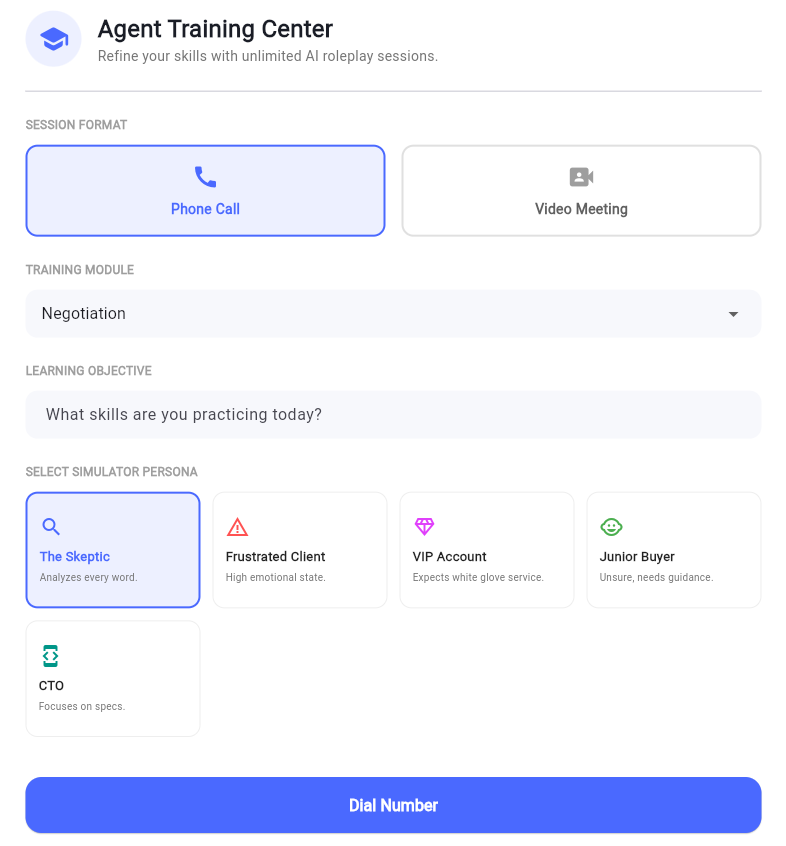
The interface allows managers to toggle between Phone and Video session formats, ensuring agents are prepared for every channel.
inteliQ handles the conversation out of the box. Our RAG system simply feeds the Guidance Brain the specifics it needs to be an expert in your world.
The Guidance Brain is pre-trained on millions of high-stakes interactions. It already knows how to navigate "The Skeptic" and de-escalate a "Frustrated Client" without any setup.
Upload your pricing, contracts, or compliance docs. The RAG system indexes these "Specifics" so the AI can reference your exact terms during live calls.
The result is a fluid, intelligent response that combines professional conversational mastery with your specific business facts.
Experience how inteliQ transforms average agents into top performers.
Book Your Demo